How to Connect InnTrend AI with Cloudbeds
Sign up, connect, disconnect, and get help with the InnTrend AI and Cloudbeds integration.
About InnTrend AI
InnTrend AI connects to your Cloudbeds property and turns its reservation data into a daily performance dashboard for owners, operators and asset managers. Once connected, your occupancy, ADR, RevPAR, pickup and on-the-books figures refresh every morning, side by side with every other hotel in your portfolio.
InnTrend AI only reads your Cloudbeds data, with one exception: if you click Update Rate in Rate Pulse, InnTrend AI changes that rate in Cloudbeds. It never creates, changes or cancels reservations.
What the integration does
After you connect, InnTrend AI builds these views from your Cloudbeds data:
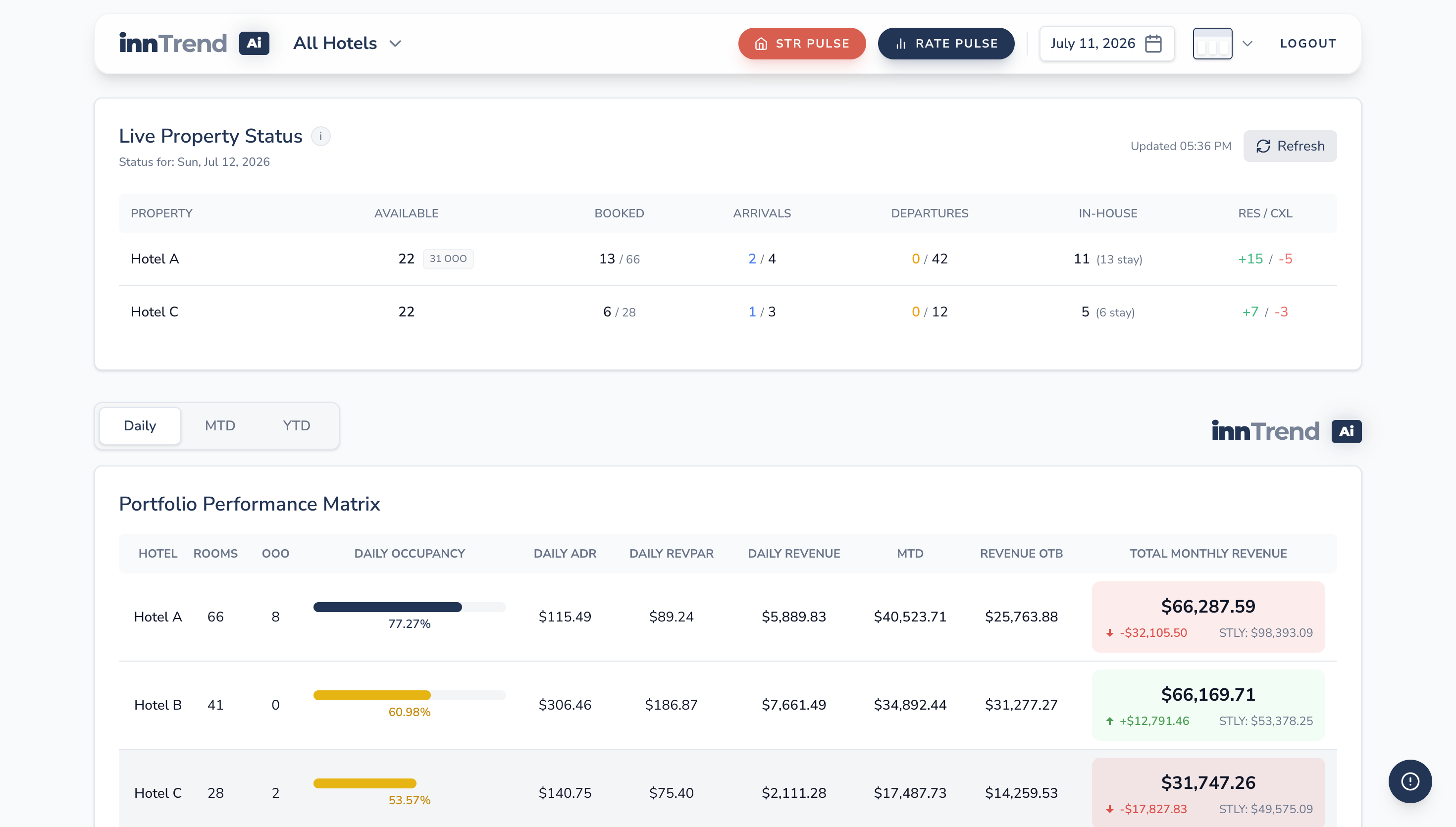
Portfolio Pulse
Live Property Status shows today's availability, arrivals, departures, in-house guests and new reservations and cancellations for each property. Below it, the Portfolio Performance Matrix shows occupancy, ADR, RevPAR, revenue and month-to-date figures in Daily, MTD and YTD views, compared with the same time last year (STLY).
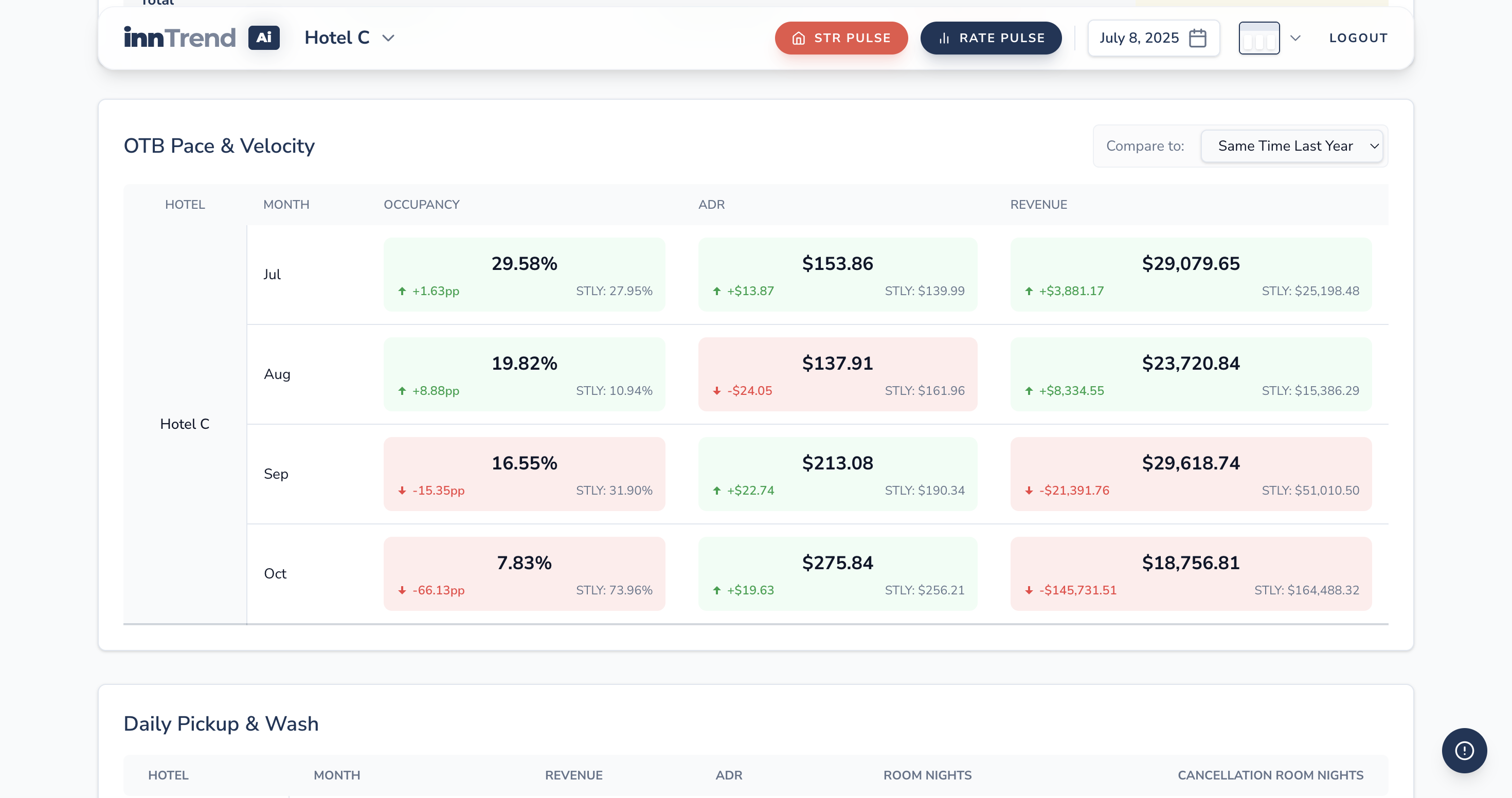
OTB Pace & Velocity
Occupancy, ADR and revenue already on the books for each upcoming month, compared with the same time last year. Green and red cells show where you are ahead or behind.
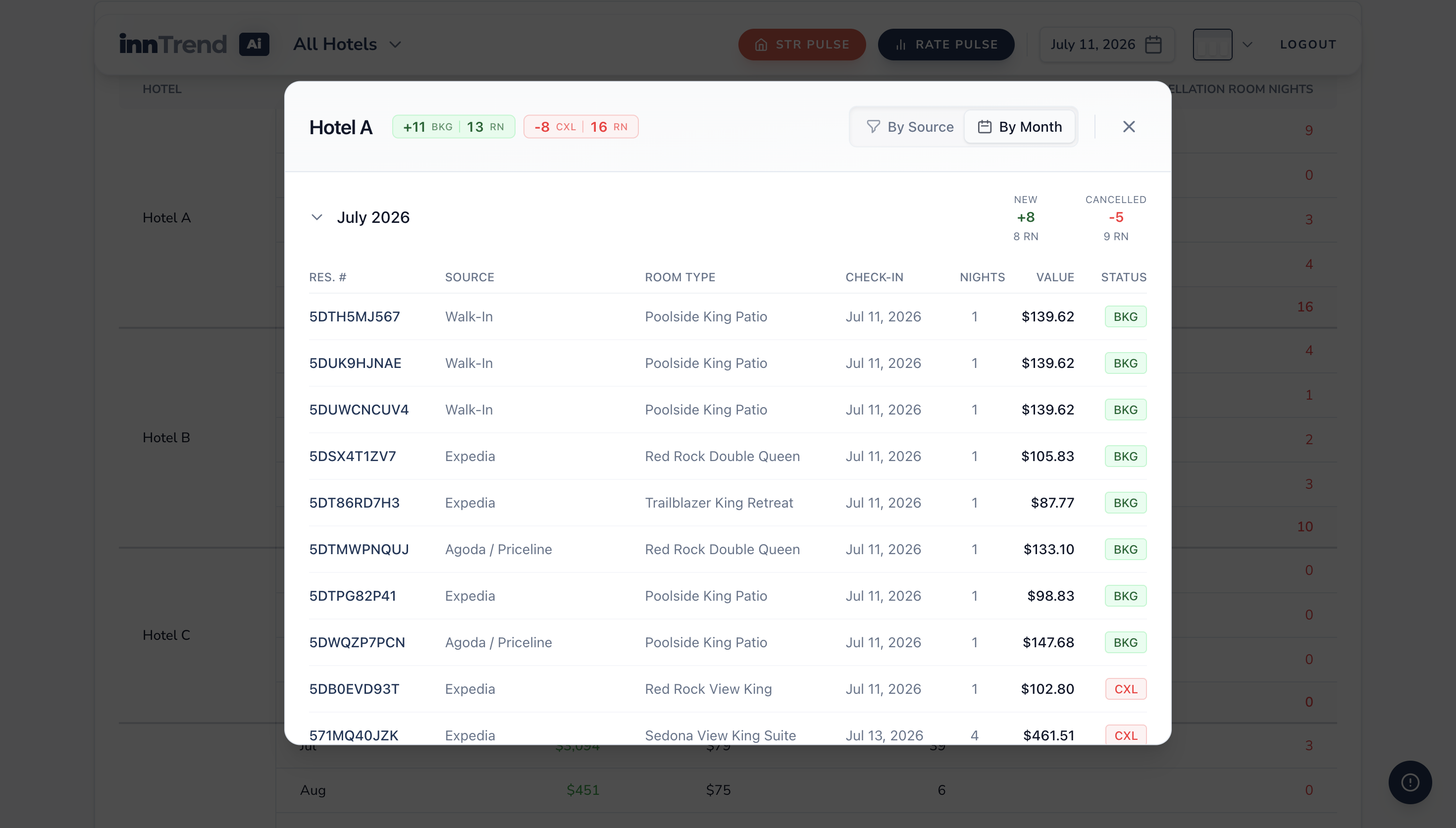
Daily Pickup & Wash
New bookings and cancellations since the previous day, by hotel and month. Click a hotel to see each reservation with its source, room type, check-in date, nights and value.
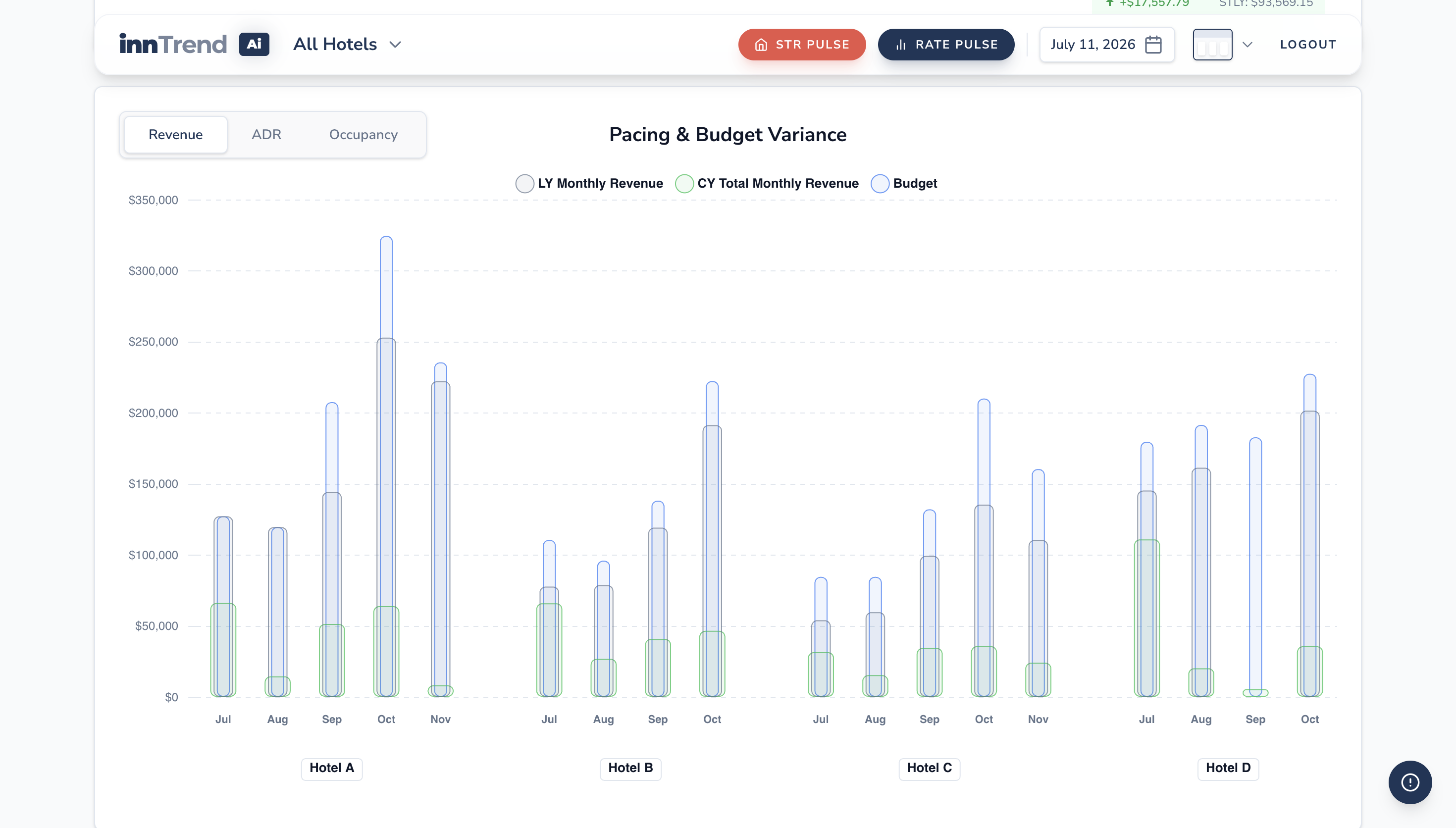
Pacing & Budget Variance
A chart of each hotel's monthly revenue, ADR or occupancy this year against last year and your budget.
Rate Pulse
Your rates next to your competitors' rates from Expedia, with your occupancy, ADR, rooms left to sell, net pickup and a recommended rate change for each date. If you choose to, you can click Update Rate to change your rate in Cloudbeds without leaving InnTrend AI.
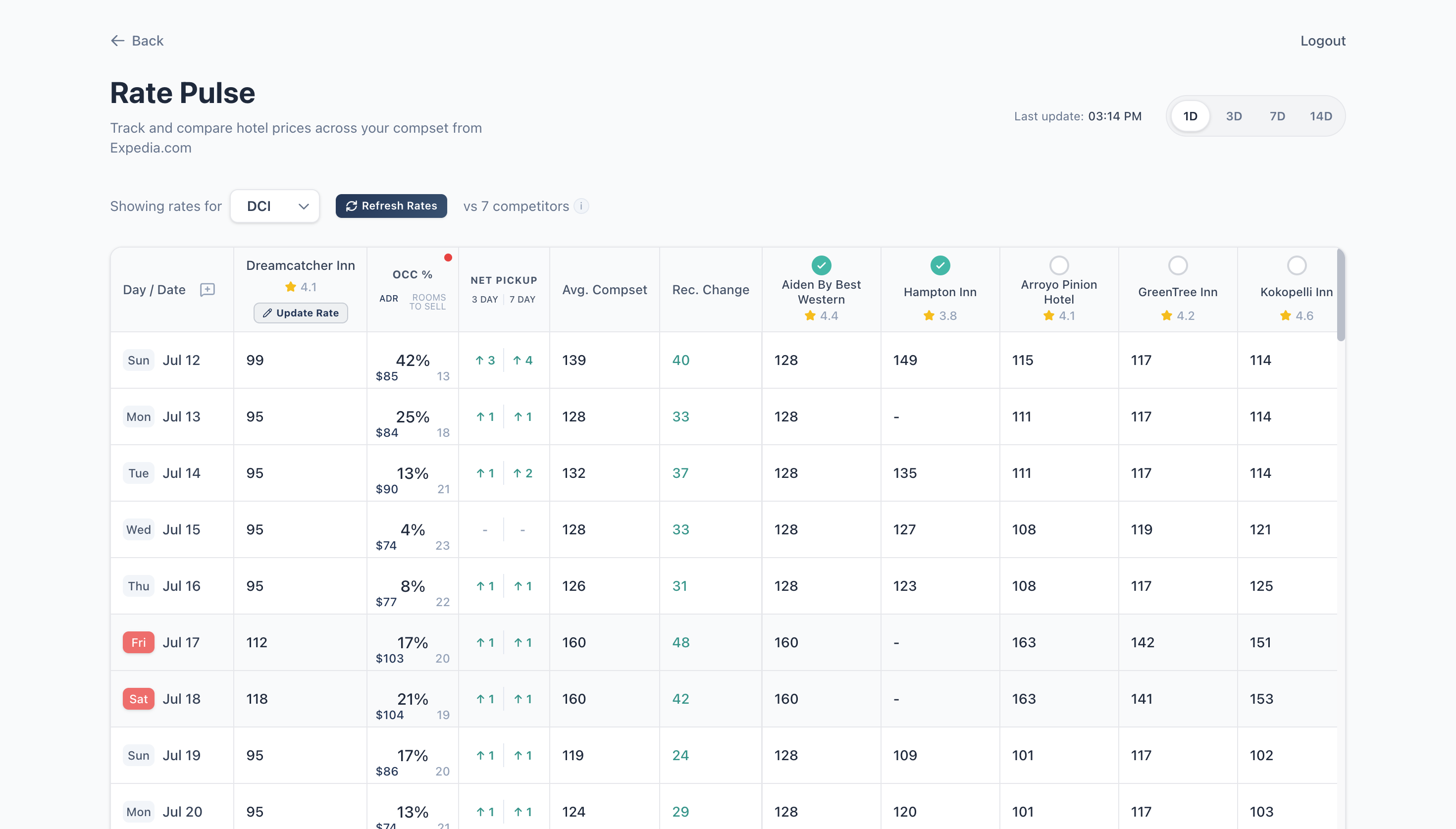
The dashboard works in a web browser on desktop and mobile. No software is installed on your property's computers.
How to sign up for InnTrend AI
You need an InnTrend AI account before you connect Cloudbeds. To set one up:
- Go to inntrend.ai/demo and fill in the request form: your name, email, phone, company, and number of hotels.
- Our team contacts you within 24 hours to schedule a 15-minute walkthrough of the dashboard.
- Pick a plan. InnTrend AI Professional costs $149 per hotel per month billed annually, or $189 billed monthly. A 7-day free trial is available.
- Review and sign the InnTrend AI Master SaaS Agreement online. We send you the signing link.
- We create your dashboard login and email it to you.
You need a Cloudbeds account with permission to install Marketplace apps (usually the property owner or an administrator).
How to connect InnTrend AI with Cloudbeds for the first time
Connecting takes about two minutes and is done from Cloudbeds.
- Log in to Cloudbeds as a user who can install apps.
- Open Apps & Marketplace and search for InnTrend AI.
- Click Connect.
- Cloudbeds shows the permissions InnTrend AI is requesting. Review them, select your property, and click Approve.
- Cloudbeds sends you back to InnTrend AI and you see a Connection Successful page. You can close that window.
- Our team is notified automatically and links the property to your account. Your first data load usually appears on the dashboard by the next morning.
If you see Connection Issue instead, our team has already been notified and will contact you. You can also contact support (see below).
What data InnTrend AI reads from Cloudbeds
Most figures sync once a day, early in the morning. Live Property Status and reservation details load from Cloudbeds when you open or refresh them.
| Cloudbeds data | Used for |
|---|---|
| Property details (name, address, contact) | Identifying the property on your dashboard |
| Room types and room counts | Occupancy and RevPAR calculations |
| Reservations with rate details (dates, status, room type, nightly rate, source) | Occupancy, ADR, revenue, pickup, cancellations and on-the-books figures |
| Today's arrivals, departures and in-house guests | Live Property Status |
| Rates | Rate Pulse comparisons and rate updates |
InnTrend AI writes to Cloudbeds only when you click Update Rate in Rate Pulse. It changes the rate for the room types and dates you choose, and nothing else.
Limitations
- Daily performance figures. Performance, pace and pickup figures refresh once each morning. Bookings made during the day appear in Live Property Status right away and in the other reports the next morning.
- Rates only. Rates are the only thing you can change from InnTrend AI. Make changes to inventory, restrictions and reservations in Cloudbeds.
- One property per connection. If you manage several Cloudbeds properties, including properties under a Cloudbeds group account, connect each property separately. All of them then appear together on one InnTrend AI dashboard.
- History. STLY comparisons need the previous year's reservations in Cloudbeds. If your property is new to Cloudbeds, those comparisons fill in as history builds up.
How to disconnect the apps
You disconnect InnTrend AI from Cloudbeds. Cloudbeds' own guide covers the steps: Disconnect an app from myfrontdesk.
- Log in to Cloudbeds and open Apps & Marketplace.
- Go to your connected apps and find InnTrend AI.
- Click Disconnect and confirm.
What happens on the InnTrend AI side
- Disconnecting removes InnTrend AI's access to your property right away. From then on, InnTrend AI can't read your data or update your rates.
- Daily syncing for that property stops. Data collected before you disconnect stays on your dashboard, but it no longer updates.
- Disconnecting does not cancel your InnTrend AI subscription. To cancel or close your account, or to have your stored data deleted, email shlok@inntrend.ai.
- To reconnect later, follow the connection steps above.
FAQs
Can InnTrend AI change anything in my Cloudbeds account?
Only your rates, and only when you click Update Rate in Rate Pulse. InnTrend AI never changes reservations, inventory or guest information.
When will I see my data after connecting?
Usually by the next morning, after the first daily sync.
My numbers don't match a Cloudbeds report. Why?
Performance figures reflect Cloudbeds as of the morning sync. Changes made after that appear the next day. If the numbers are still different after the next sync, contact support and include the date and figure you're comparing.
Can I see properties on other PMS systems on the same dashboard?
Yes. InnTrend AI also connects to Mews, Clock PMS+, HotelKey, ChoiceADVANTAGE, Guesty and Hospitable, so mixed portfolios appear in one view.
How to get support
- Support form: inntrend.ai/support
- Email: shlok@inntrend.ai
We reply within three business days (US Arizona time). Include your property name and Cloudbeds property ID so we can find your account quickly.
For problems with Cloudbeds itself, such as logging in or Cloudbeds reports, contact Cloudbeds support.